Building a Highly Available AWS Web Application
Building a highly available AWS web application using Terraform, Amazon EC2, Auto Scaling, Application Load Balancer, Amazon CloudWatch and AWS Fault Injection Service
Introduction
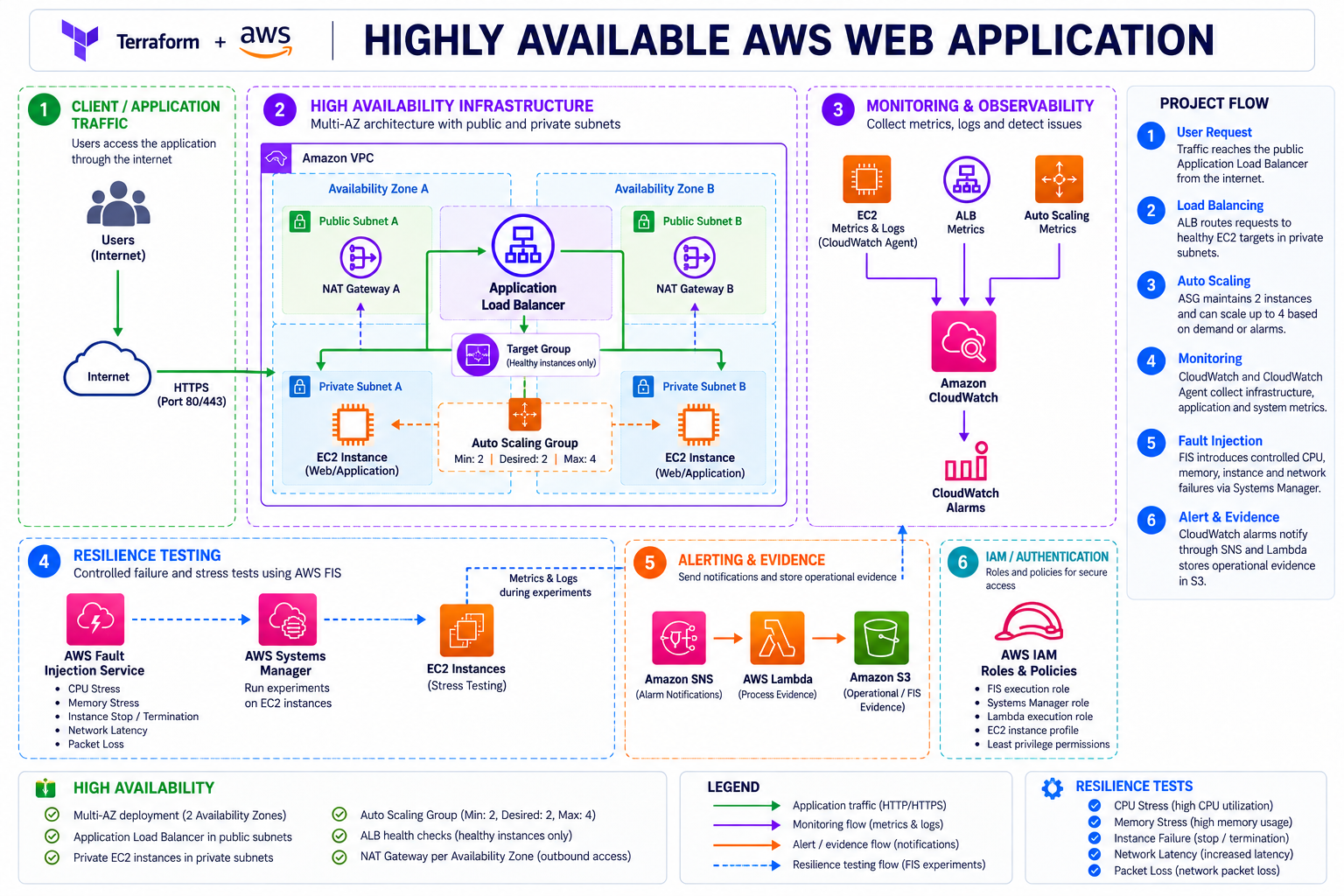
This project was created to build a highly available AWS web application focused on infrastructure resilience, automated scaling, monitoring, and controlled failure testing.
The objective was to create a practical environment where a web application could remain available across multiple Availability Zones, automatically replace failed EC2 instances, detect infrastructure problems through Amazon CloudWatch, and validate the behaviour of the environment through controlled fault-injection experiments.
The infrastructure is deployed using Terraform and combines an Application Load Balancer, an EC2 Auto Scaling Group, private subnets, CloudWatch monitoring, AWS Systems Manager, AWS Fault Injection Service, Amazon SNS, AWS Lambda, and Amazon S3.
The project also includes controlled CPU, memory, instance, and network failure scenarios to verify that the monitoring and resilience mechanisms behave as expected.
This project was also developed as part of my preparation for the AWS Certified CloudOps Engineer - Associate certification. The practical work provided an opportunity to reinforce several operational concepts from the certification, particularly infrastructure monitoring, CloudWatch metrics and alarms, Systems Manager, automated responses, and resilience testing. Rather than treating these topics only as theoretical concepts, they were incorporated into a working AWS environment and validated through controlled experiments.
Services Used
| Category | AWS Service |
|---|---|
| Networking | Amazon VPC |
| Compute | Amazon EC2 |
| Compute | EC2 Auto Scaling |
| Load Balancing | Application Load Balancer |
| Monitoring | Amazon CloudWatch |
| Monitoring | CloudWatch Agent |
| Operations | AWS Systems Manager |
| Resilience | AWS Fault Injection Service |
| Notifications | Amazon SNS |
| Automation | AWS Lambda |
| Storage | Amazon S3 |
| Security | AWS IAM |
| Infrastructure as Code | Terraform |
Architecture
Configuration
Cost considerations
This project was developed with AWS resource consumption in mind. Running EC2 instances continuously as part of an Auto Scaling Group, together with an Application Load Balancer and repeated AWS Fault Injection Service experiments, generates ongoing AWS costs. For this reason, the infrastructure and experiments were provisioned and executed selectively, with resources stopped or destroyed when they were no longer required.
Configuring a Web Server on Auto Scaling Instances
The EC2 instances needed to provide a consistent web service behind the Application Load Balancer.
Solution: NGINX was installed and configured on the EC2 instances to serve the web application. Its configuration was included in the instance bootstrap process through user_data, ensuring that every new instance launched by the Auto Scaling Group is automatically prepared to serve HTTP traffic.
This allows the ALB to distribute traffic across the available instances without requiring manual configuration.
Highly Available Network
The first part of the project focuses on creating the network foundation for the application.
The VPC is divided across two Availability Zones, with public and private subnets.
The Application Load Balancer is deployed in the public subnets while the application EC2 instances are placed in private subnets.
The private subnets use NAT Gateways for outbound connectivity.
A NAT Gateway is deployed in each Availability Zone so that the private instances do not depend on a single NAT Gateway.
This creates the following logical structure:
Internet → Public Subnets → ALB → Private Subnets → EC2
The use of two Availability Zones provides redundancy at the network and application layers.
Application Load Balancer
The Application Load Balancer provides the entry point for the web application.
Incoming requests are distributed to the EC2 instances through an Application Load Balancer Target Group.
The target group performs health checks against the application instances.
If an instance becomes unhealthy, the ALB stops routing traffic to that target.
This health-check mechanism is particularly important when combined with Auto Scaling because it allows the infrastructure to distinguish between healthy and unhealthy application capacity.
The resulting traffic path is:
Client → ALB → Target Group → Healthy EC2 instance
EC2 Auto Scaling Group
The application instances are managed by an EC2 Auto Scaling Group.
The final configuration uses:
- Minimum:
2 - Desired:
2 - Maximum:
4
The two instances are distributed across the two Availability Zones.
The Auto Scaling Group is also associated with the Application Load Balancer target group.
This means that the application layer combines:
Multi-AZ + Load Balancing + Auto Scaling
If an instance is terminated or becomes unavailable, Auto Scaling can launch a replacement instance and restore the desired capacity.
CloudWatch Monitoring
Amazon CloudWatch is used to monitor the health and performance of the infrastructure, including EC2, Auto Scaling, the Application Load Balancer, memory, disk, and network metrics.
The objective is to detect infrastructure degradation and changes in application capacity.
CloudWatch Agent
The CloudWatch Agent is installed on the EC2 instances to collect operating-system metrics that are not available through the standard EC2 metrics.
One of the most important metrics collected is:
mem_used_percent
The metric is published under the CWAgent namespace.
This allows memory consumption to be monitored alongside standard EC2 metrics such as CPU utilisation.
The CloudWatch Agent also provides a mechanism for collecting additional operating-system and application information from the instances.
Resilence & Fault Injection Testing
The resilience of the infrastructure was validated using AWS Fault Injection Service (FIS). Controlled failure scenarios were introduced against the EC2 instances managed by the Auto Scaling Group to validate the behaviour of the infrastructure, monitoring and alerting mechanisms.
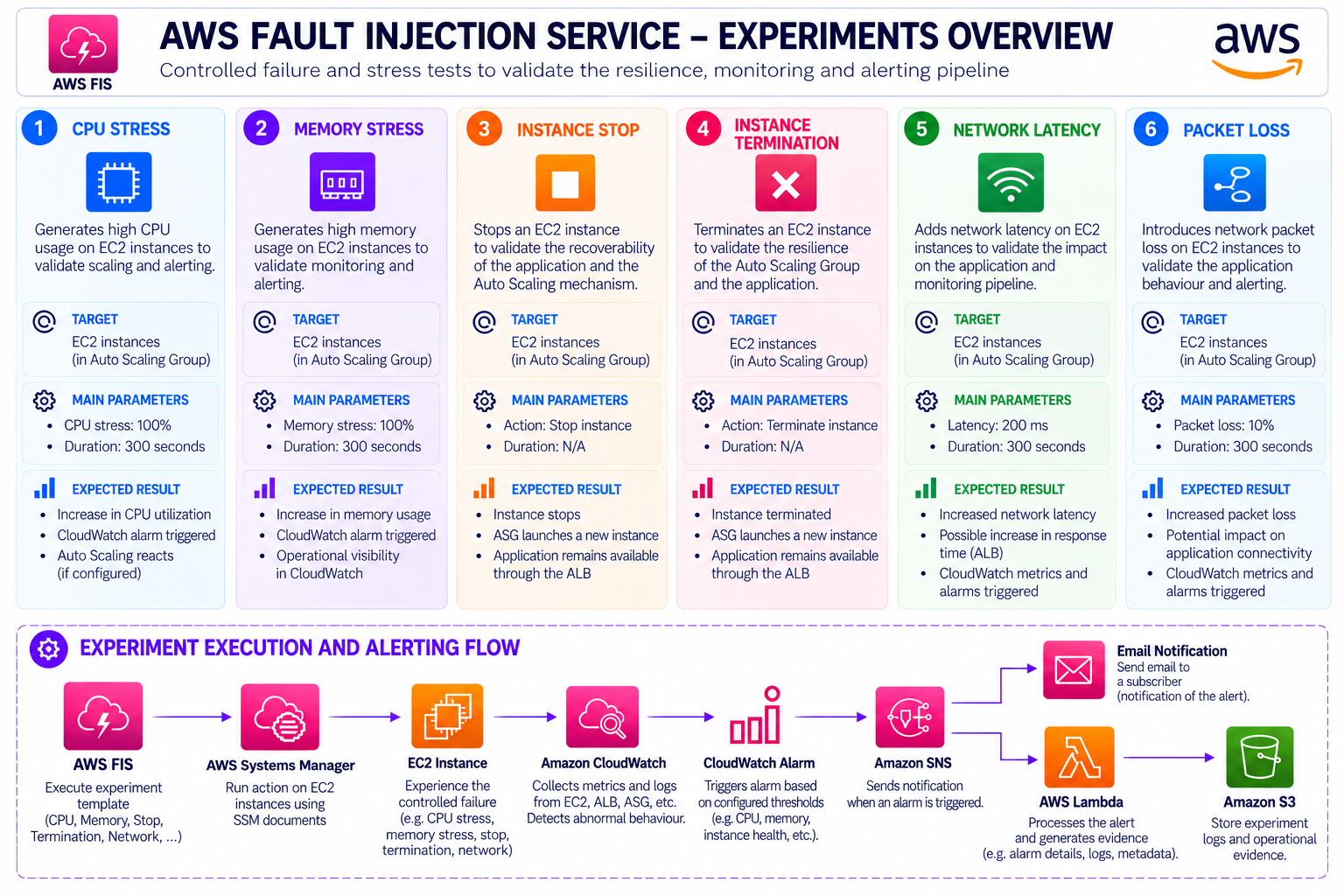
Detailed execution evidence and experiment results are available in the project repository.
Alerting & Operational Response
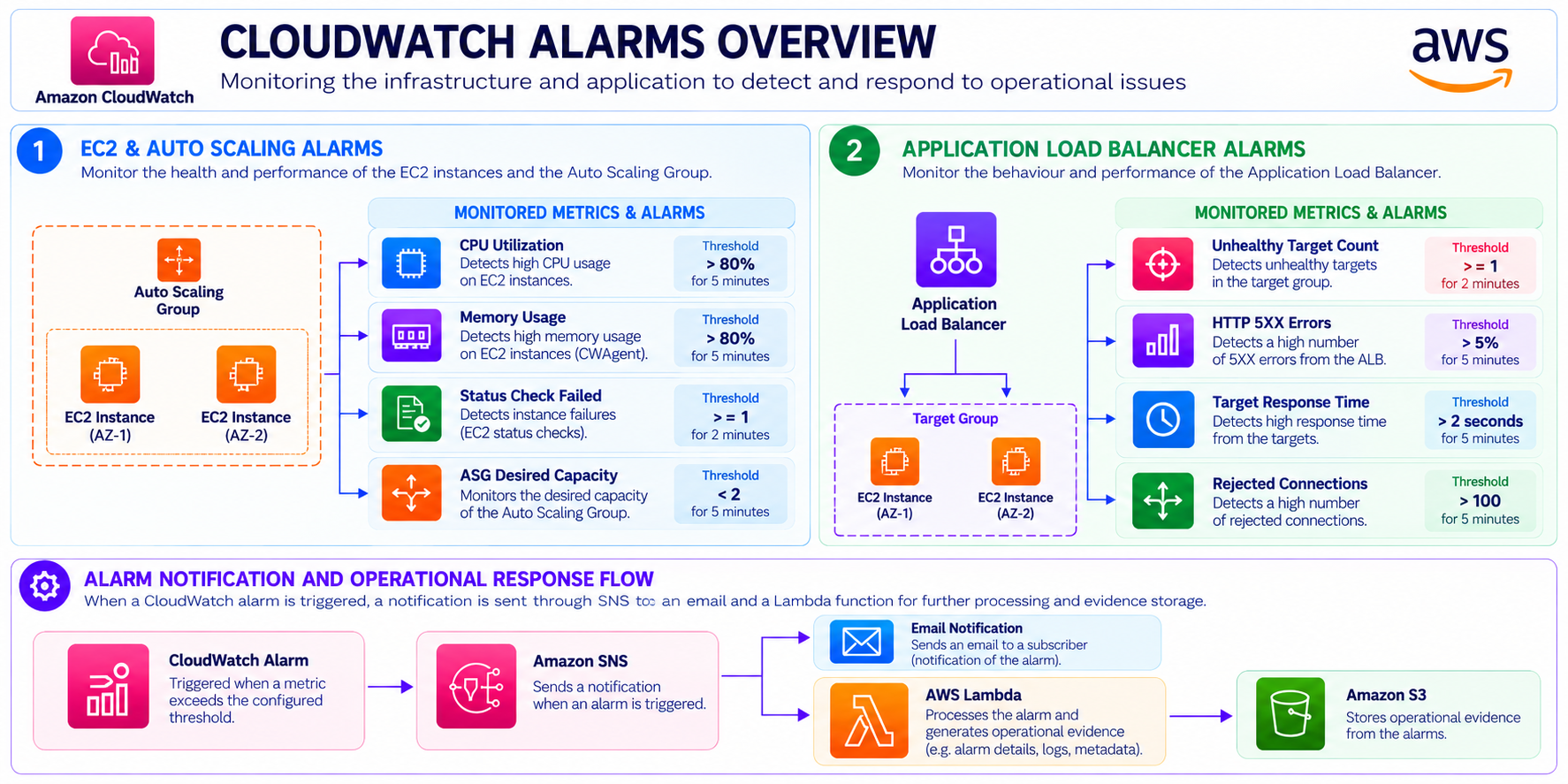
CloudWatch alarms were configured to monitor key infrastructure and Application Load Balancer conditions and to trigger operational events when defined thresholds are reached. The following diagram summarises the monitoring and alerting configuration implemented in the project:
Operational Management with Systems Manager
AWS Systems Manager was used as the operational interface for the EC2 instances and as part of the AWS FIS execution workflow.
FIS uses Systems Manager documents to perform controlled actions on the target instances, allowing stress and failure scenarios to be executed without requiring direct SSH access.
This integration also provided practical experience with AWS Systems Manager as an operational management tool within a CloudOps environment.
Challenges & Solutions
High availability: The application was distributed across two Availability Zones using an Application Load Balancer and Auto Scaling Group.
Centralising operational logs: Operational logs are generated and retained both locally and centrally. A dedicated log path is created on each EC2 instance to store local logs, while relevant operational evidence is also stored in an Amazon S3 bucket.
This provides local access for troubleshooting while maintaining a centralised and persistent location for reviewing logs and evidence generated during the project.
Instance failure: AWS FIS was used to deliberately stop or terminate EC2 instances and validate the Auto Scaling recovery mechanism.
Memory monitoring: Memory is not a standard EC2 CloudWatch metric, so the CloudWatch Agent was introduced to publish mem_used_percent.
Fault injection: Instead of assuming that the architecture was resilient, AWS FIS was used to generate controlled CPU, memory, instance and network failures.
Operational alerting: CloudWatch Alarms and SNS were combined to convert infrastructure conditions into operational notifications.
Evidence collection: Lambda and S3 were integrated into the operational workflow to retain evidence generated by infrastructure events and resilience tests.
Infrastructure reproducibility: Terraform was used to manage the complete environment as Infrastructure as Code.
Project Results
- Highly available web application deployed across two Availability Zones.
- Application Load Balancer providing traffic distribution and health checks.
- EC2 Auto Scaling Group configured with a normal capacity of two instances and a maximum capacity of four.
- Private EC2 application layer.
- Multi-AZ NAT Gateway architecture.
- CloudWatch infrastructure monitoring.
- CloudWatch Agent monitoring for memory and operating-system metrics.
- CloudWatch alarms for application and infrastructure conditions.
- Controlled CPU stress testing using AWS FIS.
- Controlled memory stress testing using AWS FIS.
- EC2 instance failure testing using AWS FIS.
- Network latency and packet-loss testing using AWS FIS.
- Systems Manager integration for controlled EC2 operations.
- SNS-based alerting.
- Lambda-based operational evidence processing.
- S3-based evidence storage.
- Infrastructure fully managed using Terraform.
References
- Amazon EC2 Documentation
- NGINX Documentation
- NGINX Documentation - Configuring NGINX as a Web Server
- Amazon VPC Documentation
- Amazon EC2 Auto Scaling Documentation
- Elastic Load Balancing Documentation
- Amazon CloudWatch Documentation
- CloudWatch Agent Documentation
- AWS Systems Manager Documentation
- AWS Fault Injection Service Documentation
- Amazon SNS Documentation
- AWS Lambda Documentation
- Amazon S3 Documentation
- AWS Identity and Access Management Documentation
- Terraform AWS Provider
Future improvements
Highly Available Database Architecture
Extend the current high-availability architecture to the data layer by introducing a managed Amazon RDS Multi-AZ database with automated failover.
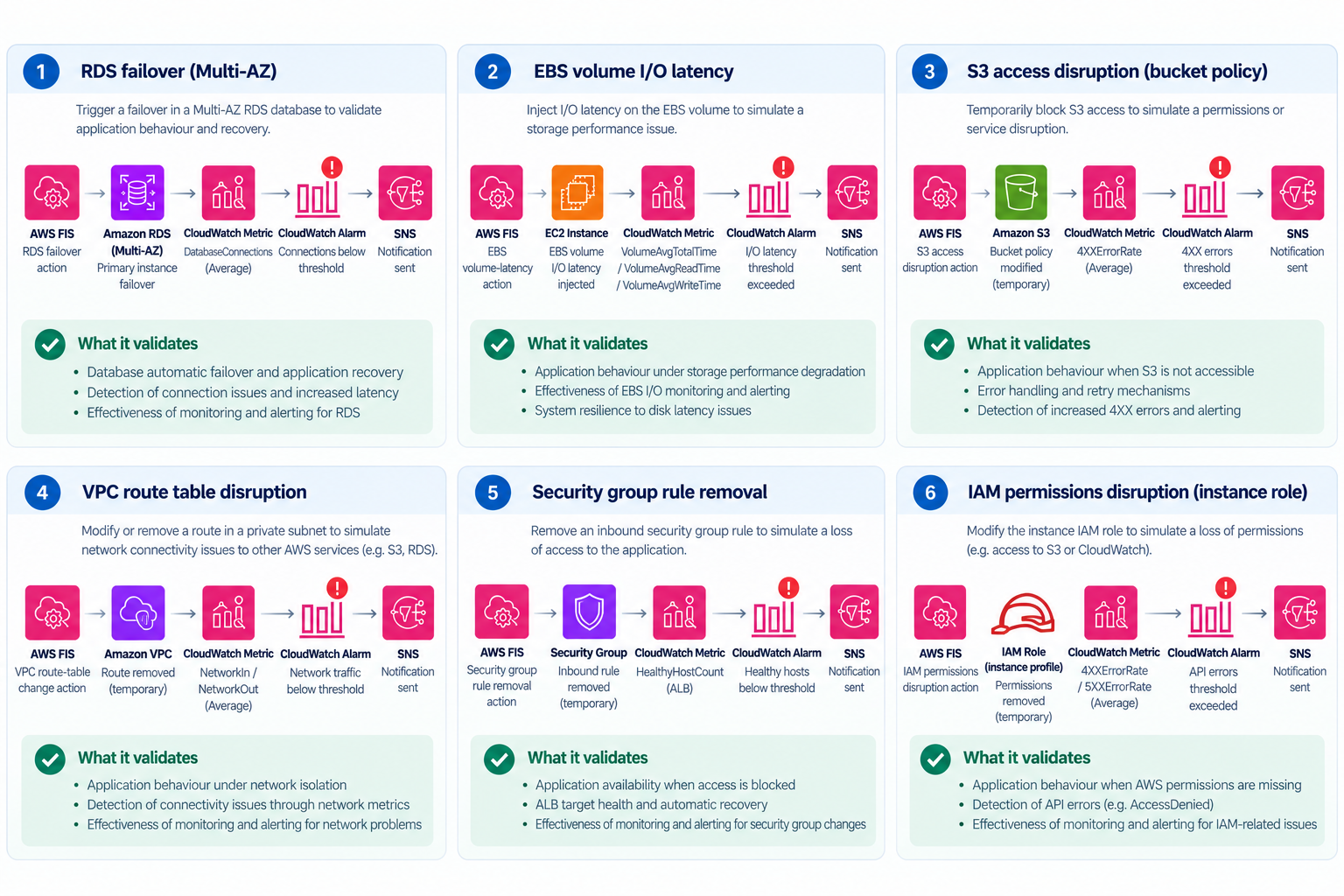
Additional Resilience & Fault Injection Scenarios
Expand the resilience testing scope with additional FIS scenarios covering database, storage, networking, security and IAM failures:
Project Code
You can find the Terraform code used in this project in the corresponding GitHub repository directory.