Creating an RDS DB Instance
Deploying and configuring an Amazon RDS database instance using AWS managed database services.
Introduction
In this project I created and configured an Amazon RDS database instance.
The objective was to understand:
- managed relational databases
- RDS deployment fundamentals
- storage configuration
- advanced database settings
- database administration concepts
This project is especially useful for:
- cloud database learning
- backend development
- managed infrastructure environments
- relational database understanding
Services Used
The project uses the following AWS services:
- Amazon RDS
Architecture
The architecture consists of:
Application
    ↓
RDS Instance
    ↓
Managed Storage
Amazon RDS abstracts infrastructure management and allows focusing on database administration and application connectivity.
Configuration
The database instance was configured using:
- database engine selection
- instance specifications
- authentication settings
- storage allocation
- networking configuration
Additional concepts explored:
- monitoring
- backups
- maintenance windows
- scalability
Important Considerations
Some important RDS concepts:
RDS automates:
Backups
Patching
Monitoring
Scaling
Security considerations:
- VPC integration
- security groups
- IAM support
- encryption capabilities
Free Tier considerations:
- limited usage quotas
- educational workloads
- testing environments
Lessons Learned
This project helped reinforce:
- relational databases
- managed services
- storage planning
- database deployment
- security principles
- scalability concepts
References
Final Result
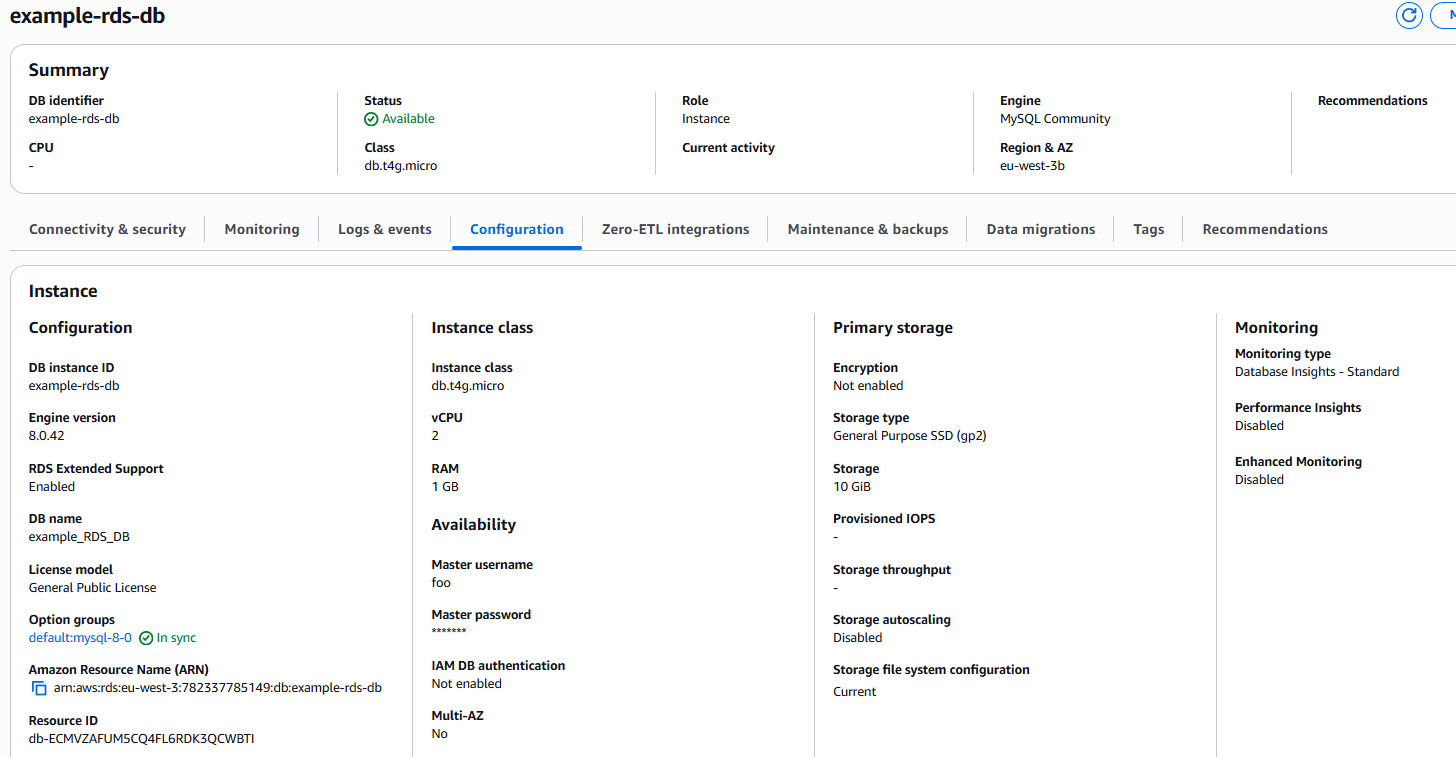
Below is the final RDS database instance configuration.
Project Code
You can find the Terraform code used in this project in the following GitHub directory.