Introduction
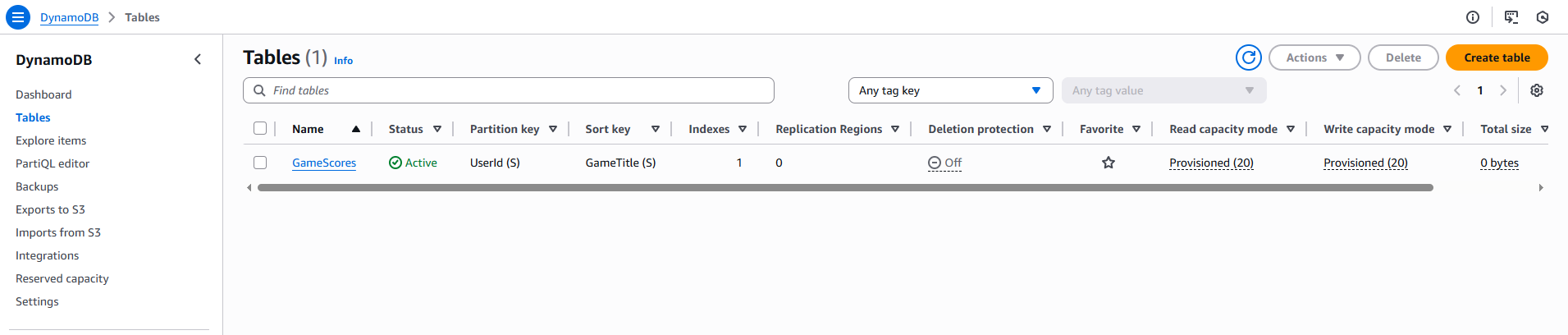
In this project I created and tested a DynamoDB table using provisioned capacity mode.
The objective was to understand the fundamentals of Amazon DynamoDB, including:
- table creation
- partition keys
- provisioned throughput
- queries and scans
- capacity units
- autoscaling concepts
This project is especially useful for:
- AWS beginners
- serverless architectures
- NoSQL database learning
- scalable cloud applications
Services Used
The project uses the following AWS services:
- Amazon DynamoDB
Architecture
The architecture consists of:
Client
   ↓
DynamoDB Table
Data is inserted and queried directly against the table using provisioned throughput.
Configuration
The DynamoDB table was configured using:
- provisioned capacity mode
- partition key configuration
- test item insertion
- scans
- queries
Additional concepts explored:
- WCU and RCU
- primary keys
- DynamoDB Streams
- Global Tables
- backups and PITR
- autoscaling
Important Considerations
Some important DynamoDB concepts:
Maximum Item Size → 400 KBCapacity modes:
- Provisioned Capacity
- On-demand Capacity
Primary key models:
- Partition Key
- Partition Key + Sort Key
Additional capabilities:
- DynamoDB Streams
- Global Tables
- DAX
- adaptive capacity
Lessons Learned
This project helped reinforce:
- DynamoDB fundamentals
- NoSQL concepts
- capacity planning
- querying and scanning
- autoscaling behavior
- high availability principles
References
- DynamoDB Auto Scaling
- DynamoDB Data Protection
- Choosing the Right DynamoDB Partition Key
- DynamoDB Streams
- DynamoDB Global Tables
- DynamoDB Backup and Restore
- DynamoDB Performance and Cost Optimization
Final Result
Project Code
You can find the Terraform code used in this project in the following GitHub directory.
Loading...
Comments